
CAN bus park brake interface
Take a reliable handbrake signal off the vehicle network to enable screens, navigation and video-in-motion functions.
What a CAN bus park brake interface does
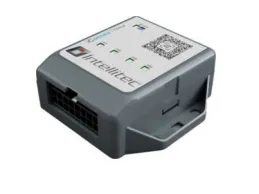
A CAN bus park brake interface reads the handbrake or park-brake state on the vehicle network and outputs a signal that tells a head unit, screen or navigation system whether the vehicle is stationary. Aftermarket displays use it to enable functions that are only allowed when parked.
Modern vehicles use electronic park brakes and carry the state as a network message, not a switched wire at the lever. The interface reads that message and provides the park-brake feed the display expects, without cutting into the vehicle's braking wiring.
Why aftermarket screens need this signal
Many head units and monitors look for a park-brake input before they'll allow video playback, address entry or certain settings. On a vehicle with an electronic park brake there's no simple wire to give them, so the display stays locked out.
- Enables parked-only functions: the screen sees a genuine handbrake state and enables what it's meant to when stationary.
- Reads the electronic park brake: it works where there's no mechanical lever or switched wire to tap.
- A clean, safe install: the signal comes off the network, not from splicing the brake wiring.
- Consistent behaviour: the same approach works across an electronic-park-brake fleet.
What the park brake signal enables
A genuine handbrake feed is what enables safe, parked-only functions on aftermarket kit.
Aftermarket head units
Enable video, navigation entry and settings that a head unit restricts to when parked.
Rear-seat and monitor screens
Allow video playback on screens where it's permitted when the vehicle is stationary.
Navigation systems
Permit destination entry and full menu access from a parked position.
Camera and DVR systems
Combine with a reverse feed for a complete camera and recording install.
Fleet and specialist displays
Give specialist in-cab displays the stationary state they rely on.
Conversion infotainment
A reliable park-brake feed for infotainment added to van and camper conversions.
The CAN KONTROL park-brake line
CAN KONTROL PARKBRAKE(opens in a new tab)
Delivers the handbrake state, and a combined ignition-and-park-brake output, for screens and video lockout.
Park brake line at Intellitec MV(opens in a new tab)Compare with CANM8 product names


Fitting a screen that needs a park brake feed?
Tell us the vehicle and the display, and our engineers will confirm the right interface off the CAN bus.
Reference
Fitting a CAN park-brake signal for a head unit
A head unit uses the park-brake input to decide when it may show video. The job here is to give it the real brake state from the network, never a permanent earth, and to prove it with the vehicle in every condition that matters.
Tools for the job
- Digital multimeter
- Wiring information for the vehicle
- Trim removal tools
- Head unit installation manual
- A second person to apply and release the brake
Supplies to have ready
- Fuse and holder for the module's supply
- Back-probe connectors for the CAN pair
- Lead for the park-brake input
- Cable ties and labels
- 1
Study the head unit's lockout input
Read how the screen uses its park-brake wire: some want an earth when the brake is on, others a live. Note the polarity, because the module has to present the state the screen is expecting.
- 2
Identify the brake type
Check whether the vehicle has a lever, a pedal or an electronic switch, and whether it applies itself at standstill. Electronic systems report the state as a network message, which is what the module reads.
- 3
Find the access point
The brake state is commonly carried on a chassis or body network, which may differ from the one at the diagnostic socket. Use the wiring information to find a connector with the right pair.
- 4
Pick out high and low
Trace the twisted pair, flag both wires and confirm it is alive with the ignition on. Connect with back-probes or the inductive reader so the loom stays uncut.
- 5
Supply and earth
Run a fused permanent live to the module and a firm earth to bare metal. A shaky earth can make the brake state chatter, so treat it with the same care as the supply.
- 6
Wire the output to the head unit
Connect the park-brake output to the screen's input, following the polarity you noted. Don't join it to any other earth or live on the unit; that would defeat the lockout.
- 7
Plan the combined output if needed
Some screens want ignition and park brake together. The park-brake line offers a combined ignition and park-brake output, so say so when you order rather than building it from two outputs.
- 8
Record the behaviour
Write down how the brake behaves on this vehicle, including any automatic apply, so the next engineer knows what the screen should be doing.
Checks before hand-back
- Brake applied, ignition on: the head unit should show it as parked and allow its parked-only functions.
- Release the brake: video and other restricted functions should lock out straight away.
- On an electronic brake, test both the switch and any automatic apply or release the vehicle performs.
- Disconnect and reconnect the battery, then repeat, to confirm the state is read again from cold.
- Drive a short distance and confirm the lockout holds throughout the journey.
How the park brake signal works
It reads one specific state off the network and reports it to the display.
- 1
Connect to the network
The interface joins the CAN bus and reads the park-brake message already present, with no cut into the braking wiring.
- 2
Read the park-brake state
It decodes whether the electronic or manual park brake is applied for that make and model.
- 3
Output the signal
It provides the park-brake feed the head unit or screen expects, reflecting the vehicle's true state.
- 4
Enable the display
The screen uses the signal to allow parked-only functions when the vehicle is genuinely stationary.
Which vehicles it covers
Park-brake state is carried on the CAN bus of modern cars, vans and trucks, including the electronic park brakes now common across the range. The interface reads each manufacturer's message in configuration, so one product covers a mixed fleet.
Fleet coverage is broad across UK vans and trucks, and firmware is maintained in-house. Scorpion's vehicle electronics have been UK-built since 1973.
This is a safety-relevant signal, so it should be fitted so the display only enables in-motion features where it is legal and safe to do so. The interface reports the vehicle's real park-brake state rather than a spoofed permanent input.
For a full head-unit retrofit it sits alongside the illumination and reverse feeds, so the screen dims with the dash, shows the camera on reverse, and enables parked functions correctly.
Common fitments include:
Common questions
What is a CAN bus park brake interface?
It is an interface that reads the handbrake or electronic park-brake state off the CAN bus and outputs a park-brake signal for aftermarket head units and screens, which use it to enable parked-only functions.
Why can't I wire the head unit to the handbrake?
Modern vehicles use electronic park brakes and carry the state as a network message, so there's often no mechanical switch or wire to connect to. The interface reads the network instead.
Is it safe and legal to enable video in motion?
The interface reports the vehicle's genuine park-brake state rather than a permanent spoofed input, so functions only enable when the vehicle is truly stationary. Fit and use it in line with the law and the display maker's guidance.
Will it work with an electronic park brake?
Electronic park brakes report their state as a network message, and the interface is aimed at reading it. Availability depends on the vehicle, so confirm the make, model and year with us before you order.
Can you provide park brake with other signals?
Yes. A multi-output interface can supply park brake alongside illumination, reverse and speed from one connection. Speak to us about the install.
Why does the screen show the park-brake warning even with the brake on?
Check the output polarity against the head unit's manual and test the output with a meter with the brake on and then off. No change at the output means the brake message isn't being read, so give us the vehicle details to check the configuration.
Is it acceptable that the screen lets me watch video while moving?
No. The signal must be the genuine brake state. If video plays while you move, stop and find out why, because a permanent earth or a wiring mix-up is the usual cause. Fit and use the screen in line with the law and the maker's guidance.
Why is the brake state wrong after the vehicle auto-applies at standstill?
Electronic brakes can apply and release themselves, and each change is a separate message. Tell us the make, model and year and how the automatic function behaves, and we'll check the configuration reads those events.
Why is the signal lost after a battery disconnect?
The state should return as soon as the vehicle reports it again. If it doesn't, cycle the ignition and the brake once, then check your pair connection and the module's supply for resistance.
Can I use the lever switch wire instead?
On vehicles that still have a mechanical switch, you could, but the switch wire may be part of a monitored circuit and splicing it can set a fault. The network route avoids that.
What does the combined ignition and park-brake output do?
It provides one output that reflects both states for screens that want them together. Say so in your order and we'll configure it that way.
Will it work on a vehicle with a pedal-operated park brake?
What matters is whether the vehicle reports the brake state on the network. Send us the make, model and year and we'll confirm the message is available.